
Secure Click-to-call with authentication codes
An authentication code is a short-lived, single-use credential that your back end fetches from Live Hub and passes to the widget immediately before a call. Nothing long-lived ever reaches the browser, and you decide for each request who is allowed to call. This is why an authentication code is preferable to the static credentials that the other two methods rely on. For where you make that choice, see Configure Click-to-call on Live Hub.
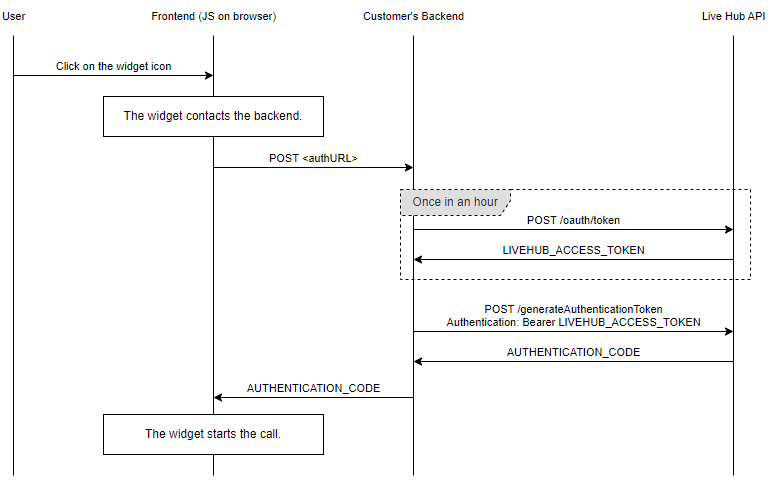
The work divides into two parts: an endpoint on your back end that issues codes, and the widget on your front end that requests one.
Implement the back end
Your back end needs an HTTP endpoint that:
- Authenticates the user browsing your site, if your use case requires it.
- Asks Live Hub for an authentication code.
- Returns the code to your front end.
To ask Live Hub for a code, first obtain an access token, as described in
Authentication, and then POST to the
generateAuthenticationCode endpoint of your Click-to-call SIP connection:
POST /api/v1/sipConnections/{sipConnectionId}/generateAuthenticationCode HTTP/1.1
Host: livehub.audiocodes.io
Content-Type: application/json
Authorization: Bearer {token}

{
  "callerPhone": "+123456789"
}
{sipConnectionId} is the ID of your Click-to-call SIP connection. callerPhone is
optional; supply it to assert the caller's phone number. For the full contract, see
Generate a Click-to-call authentication code.
Live Hub replies with the code:
{
  "authenticationCode": "LHv1_8e22ba993a094a85af5b3d9fd2c87f2a"
}
The code is valid for one minute and can be used once, so fetch a new one for each call. The access token remains valid for much longer, so reuse it across requests.
Never expose your Live Hub client credentials or access token to the front end. Only your back end should hold them.
Implement the front end
On your front end, configure the Click-to-call JavaScript widget to reach your endpoint. How you do so depends on how your endpoint authenticates the user.
If your endpoint uses session cookies, set the widget's authURL parameter to your
endpoint's URL. The widget calls it before each call to fetch a code. Your endpoint
must then mirror the Live Hub endpoint's contract: accept a POST with a JSON body,
and reply with JSON carrying a single authenticationCode field.
If your endpoint authenticates some other way, such as with a bearer token, set the
widget's generateCode attribute to a function of your own that fetches the code and
returns it.